728x90
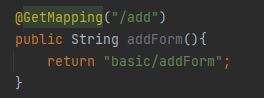
상품 등록 Controller
상품 등록 뷰
<!DOCTYPE HTML>
<html xmlns:th="http://www.thymeleaf.org">
<head>
  <meta charset="utf-8">
  <link th:href="@{/css/bootstrap.min.css}"
        href="../css/bootstrap.min.css" rel="stylesheet">
  <style>
 .container {
 max-width: 560px;
 }
 </style>
</head>
<body>
<div class="container">
  <div class="py-5 text-center">
    <h2>상품 등록 폼</h2>
  </div>
  <h4 class="mb-3">상품 입력</h4>
  <form action="item.html" th:action method="post"> <!--th:action="/basic/items/add" 같으면 비워도 된다 -->
    <div>
      <label for="itemName">상품명</label>
      <input type="text" id="itemName" name="itemName" class="formcontrol" placeholder="이름을 입력하세요">
    </div>
    <div>
      <label for="price">가격</label>
      <input type="text" id="price" name="price" class="form-control"
             placeholder="가격을 입력하세요">
    </div>
    <div>
      <label for="quantity">수량</label>
      <input type="text" id="quantity" name="quantity" class="formcontrol" placeholder="수량을 입력하세요">
    </div>
    <hr class="my-4">
    <div class="row">
      <div class="col">
        <button class="w-100 btn btn-primary btn-lg" type="submit">상품
          등록</button>
      </div>
      <div class="col">
        <button class="w-100 btn btn-secondary btn-lg"
                onclick="location.href='items.html'"
                th:onclick="|location.href='@{/basic/items}'|"
                type="button">취소</button>
      </div>
    </div>
  </form>
</div> <!-- /container -->
</body>
</html>
속성 변경 - th:action
<form action="item.html" th:action method="post"> <!--th:action="/basic/items/add" 같으면 비워도 된다 -->
- HTML form에서 action에 값이 없으면 현재 URL에 데이터를 전송한다.
- 상품 등록 폼의 URL과 실제 상품 등록을 처리하는 URL을 똑같이 맞추고 HTTP 메서드로 두 기능을 구분한다.
- 상품 등록 폼: GET /basic/items/add
- 상품 등록 처리: POST /basic/items/add
- 이렇게 하면 하나의 URL로 등록 폼과, 등록 처리를 깔끔하게 처리할 수 있다.
728x90
'스프링 MVC 1편 (백엔드 웹 개발 핵심 기술)' 카테고리의 다른 글
| Ch07. 스프링 MVC(웹 페이지 만들기) - 상품 수정 (0) | 2022.03.08 |
|---|---|
| Ch07. 스프링 MVC(웹 페이지 만들기) - 상품 등록 처리 (@ModelAttribute) (0) | 2022.03.08 |
| Ch07. 스프링 MVC(웹 페이지 만들기) - 상품 상세 (0) | 2022.03.08 |
| Ch07. 스프링 MVC(웹 페이지 만들기) - 상품 목록(타임리프) (0) | 2022.03.08 |
| Ch07. 스프링 MVC(웹 페이지 만들기) - 상품 도메인 개발 & 상품 서비스 HTML (0) | 2022.03.08 |