728x90
Item - Domain
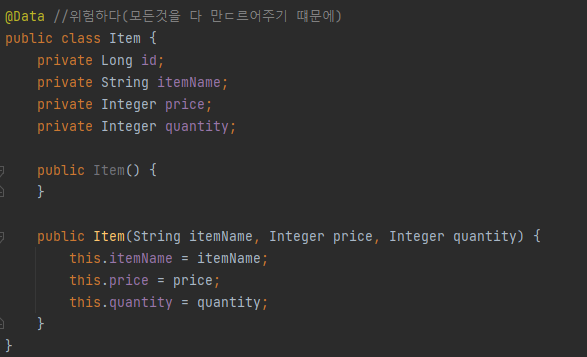
ItemRepository - 상품 저장소
@Repository //Component 스캔 대상
public class ItemRepository {
    private static final Map<Long, Item> store = new HashMap<>();  //static
    private static long sequence = 0L;

    public Item save(Item item){
        item.setId(++sequence);
        store.put(item.getId(), item);
        return item;
    }

    public Item findById(Long id){
        return store.get(id);
    }

    public List<Item> findAll(){
        return new ArrayList<>(store.values());
    }

    public void update(Long itemId, Item updateParam){
        Item findItem = findById(itemId);
        findItem.setItemName(updateParam.getItemName());
        findItem.setPrice(updateParam.getPrice());
        findItem.setQuantity(updateParam.getQuantity());
    }

    public void clearStore(){
        store.clear();
    }
}
ItemRepositoryTest - 상품 저장소 테스트
class ItemRepositoryTest {

    ItemRepository itemRepository = new ItemRepository();

    @AfterEach
    void afterEach(){
        itemRepository.clearStore();
    }

    @Test
    void save(){
        //given
        Item item = new Item("itemA", 10000, 10);

        //when
        Item saveItem = itemRepository.save(item);
        //then
        Item findItem = itemRepository.findById(saveItem.getId());
        assertThat(findItem).isEqualTo(saveItem);
    }

    @Test
    void findAll(){
        //given
        Item item1 = new Item("item1", 10000, 10);
        Item item2 = new Item("item2", 20000, 20);
        itemRepository.save(item1);
        itemRepository.save(item2);
        //when
        List<Item> result = itemRepository.findAll();
        //then
        assertThat(result.size()).isEqualTo(2);
        assertThat(result).contains(item1, item2);
    }

    @Test
    void updateItem(){
        //given
        Item item = new Item("item1", 10000, 10);
        Item saveItem = itemRepository.save(item);
        Long itemId = saveItem.getId();

        //when1
        Item updateParam = new Item("item2", 20000, 30);
        itemRepository.update(itemId, updateParam);

        //then
        Item findItem = itemRepository.findById(itemId);
        assertThat(findItem.getItemName()).isEqualTo(updateParam.getItemName());
        assertThat(findItem.getPrice()).isEqualTo(updateParam.getPrice());
        assertThat(findItem.getQuantity()).isEqualTo(updateParam.getQuantity());

    }
}
상품 서비스 HTML
- 부트스트랩을 다운로드 하자
- https://getbootstrap.com/docs/5.0/getting-started/download/
Download
Download Bootstrap to get the compiled CSS and JavaScript, source code, or include it with your favorite package managers like npm, RubyGems, and more.
getbootstrap.com
- 압축을 출고 bootstrap.min.css를 복사해서 다음 폴더에 추가하자
- resources/static/css/bootstrap.min.css
- addForm.html
<!DOCTYPE HTML>
<html>
<head>
  <meta charset="utf-8">
  <link href="../css/bootstrap.min.css" rel="stylesheet">
  <style>
 .container {
 max-width: 560px;
 }
 </style>
</head>
<body>
<div class="container">
  <div class="py-5 text-center">
    <h2>상품 등록 폼</h2>
  </div>
  <h4 class="mb-3">상품 입력</h4>
  <form action="item.html" method="post">
    <div>
      <label for="itemName">상품명</label>
      <input type="text" id="itemName" name="itemName" class="formcontrol" placeholder="이름을 입력하세요">
    </div>
    <div>
      <label for="price">가격</label>
      <input type="text" id="price" name="price" class="form-control"
             placeholder="가격을 입력하세요">
    </div>
    <div>
      <label for="quantity">수량</label>
      <input type="text" id="quantity" name="quantity" class="formcontrol" placeholder="수량을 입력하세요">
    </div>
    <hr class="my-4">
    <div class="row">
      <div class="col">
        <button class="w-100 btn btn-primary btn-lg" type="submit">상품
          등록</button>
      </div>
      <div class="col">
        <button class="w-100 btn btn-secondary btn-lg"
                onclick="location.href='items.html'" type="button">취소</button>
      </div>
    </div>
  </form>
</div> <!-- /container -->
</body>
</html>- editForm.html
<!DOCTYPE HTML>
<html>
<head>
  <meta charset="utf-8">
  <link href="../css/bootstrap.min.css" rel="stylesheet">
  <style>
 .container {
 max-width: 560px;
 }
 </style>
</head>
<body>
<div class="container">
  <div class="py-5 text-center">
    <h2>상품 수정 폼</h2>
  </div>
  <form action="item.html" method="post">
    <div>
      <label for="id">상품 ID</label>
      <input type="text" id="id" name="id" class="form-control" value="1"
             readonly>
    </div>
    <div>
      <label for="itemName">상품명</label>
      <input type="text" id="itemName" name="itemName" class="formcontrol" value="상품A">
    </div>
    <div>
      <label for="price">가격</label>
      <input type="text" id="price" name="price" class="form-control"
             value="10000">
    </div>
    <div>
      <label for="quantity">수량</label>
      <input type="text" id="quantity" name="quantity" class="formcontrol" value="10">
    </div>
    <hr class="my-4">
    <div class="row">
      <div class="col">
        <button class="w-100 btn btn-primary btn-lg" type="submit">저장
        </button>
      </div>
      <div class="col">
        <button class="w-100 btn btn-secondary btn-lg"
                onclick="location.href='item.html'" type="button">취소</button>
      </div>
    </div>
  </form>
</div> <!-- /container -->
</body>
</html>- item.html
<!DOCTYPE HTML>
<html>
<head>
  <meta charset="utf-8">
  <link href="../css/bootstrap.min.css" rel="stylesheet">
  <style>
 .container {
 max-width: 560px;
 }
 </style>
</head>
<body>
<div class="container">
  <div class="py-5 text-center">
    <h2>상품 상세</h2>
  </div>
  <div>
    <label for="itemId">상품 ID</label>
    <input type="text" id="itemId" name="itemId" class="form-control"
           value="1" readonly>
  </div>
  <div>
    <label for="itemName">상품명</label>
    <input type="text" id="itemName" name="itemName" class="form-control"
           value="상품A" readonly>
  </div>
  <div>
    <label for="price">가격</label>
    <input type="text" id="price" name="price" class="form-control"
           value="10000" readonly>
  </div>
  <div>
    <label for="quantity">수량</label>
    <input type="text" id="quantity" name="quantity" class="form-control"
           value="10" readonly>
  </div>
  <hr class="my-4">
  <div class="row">
    <div class="col">
      <button class="w-100 btn btn-primary btn-lg"
              onclick="location.href='editForm.html'" type="button">상품 수정</button>
    </div>
    <div class="col">
      <button class="w-100 btn btn-secondary btn-lg"
              onclick="location.href='items.html'" type="button">목록으로</button>
    </div>
  </div>
</div> <!-- /container -->
</body>
</html>
- items.html
<!DOCTYPE HTML>
<html>
<head>
  <meta charset="utf-8">
  <link href="../css/bootstrap.min.css" rel="stylesheet">
</head>
<body>
<div class="container" style="max-width: 600px">
  <div class="py-5 text-center">
    <h2>상품 목록</h2>
  </div>
  <div class="row">
    <div class="col">
      <button class="btn btn-primary float-end"
              onclick="location.href='addForm.html'" type="button">상품
        등록</button>
    </div>
  </div>
  <hr class="my-4">
  <div>
    <table class="table">
      <thead>
      <tr>
        <th>ID</th>
        <th>상품명</th>
        <th>가격</th>
        <th>수량</th>
      </tr>
      </thead>
      <tbody>
      <tr>
        <td><a href="item.html">1</a></td>
        <td><a href="item.html">테스트 상품1</a></td>
        <td>10000</td>
        <td>10</td>
      </tr>
      <tr>
        <td><a href="item.html">2</a></td>
        <td><a href="item.html">테스트 상품2</a></td>
        <td>20000</td>
        <td>20</td>
      </tr>
      </tbody>
    </table>
  </div>
</div> <!-- /container -->
</body>
</html>
728x90
'스프링 MVC 1편 (백엔드 웹 개발 핵심 기술)' 카테고리의 다른 글
| Ch07. 스프링 MVC(웹 페이지 만들기) - 상품 상세 (0) | 2022.03.08 |
|---|---|
| Ch07. 스프링 MVC(웹 페이지 만들기) - 상품 목록(타임리프) (0) | 2022.03.08 |
| Ch07. 스프링 MVC(웹 페이지 만들기) - 요구사항 분석하기 (0) | 2022.03.08 |
| Ch06. 스프링 MVC(기본 기능) - 요청 매핑 헨들러 어뎁터 구조 (0) | 2022.03.07 |
| Ch06. 스프링 MVC(기본 기능) - HTTP 메시지 컨버터 (0) | 2022.03.07 |