728x90
- 클라이언트에서 서버로 요청 데이터를 전달할 때는 주로 다음 3가지 방법을 사용한다.
- GET - 쿼리 파라미터
- /url? username=hello&age=20
- 메시지 바디 없이, URL의 쿼리 파라미터에 데이터를 포함해서 전달
- 예) 검색, 필터, 페이징 등에서 많이 사용하는 방식
- POST - HTML Form
- content-type: application/x-www-form-urlencoded
- 메시지 바디에 쿼리 파리 미터 형식으로 전달 username=hello&age=20
- 예) 회원 가입, 상품 주문, HTML Form 사용
- HTTP message body에 데이터를 직접 담아서 요청
- HTTP API에서 주로 사용, JSON, XML, TEXT
- 데이터 형식은 주로 JSON 사용
- POST, PUT, PATCH
- GET - 쿼리 파라미터
HTTP 요청 파라미터 - 쿼리 파라미터, HTML Form
- GET, 쿼리 파라미터 전송
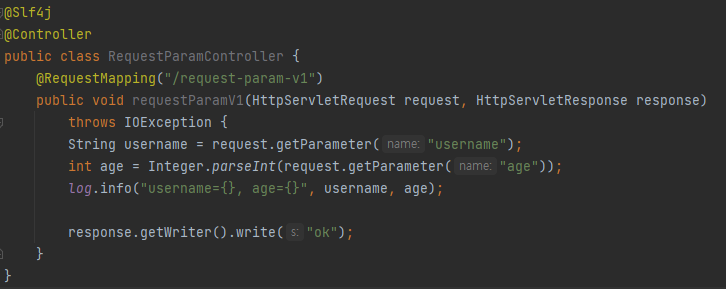
- GET 쿼리 파리 미터 전송 방식이든, POST HTML Form 전송 방식이든 둘 다 형식이 같으므로 구분 없이 조회할 수 있다
- HttpServletRequest가 제공하는 방식으로 요청 파라미터를 조회했다.
참고
- Jar를 사용하면 webapp 경로를 사용할 수 없다. 이제부터 정적 리소스도 클래스 경로에 함께 포함해야 한다
HTTP 요청 파라미터 - @RequestParam
@ResponseBody //RestController 와 같은 동작
@RequestMapping("/request-param-v2")
public String requestParamV2(
    @RequestParam("username") String memberName,
    @RequestParam("age") int memberAge
){
    log.info("username={}, age={}", memberName, memberAge);
    return "ok";
}- @RequestParam : 파라미터 이름으로 바인딩
- name(value) 속성이 파라미터 이름으로 사용
- @ResponseBody : View 조회를 무시하고, Http Body에 값을 그대로 전송
@ResponseBody
@RequestMapping("/request-param-v3")
public String requestParamV3(
    @RequestParam String username,
    @RequestParam int age
){
    log.info("username={}, age={}", username, age);
    return "ok";
}- @RequestParam의 변수명이 파라미터 명이랑 같을 경우 생략 가능
@ResponseBody
@RequestMapping("/request-param-v4")
public String requestParamV4(String username, int age){
    log.info("username={}, age={}", username, age);
    return "ok";
}- 파라미터의 타입이 String , int , Integer 등의 단순 타입이면 @RequestParam 도 생략 가능
- 단, 이렇게 애노테이션을 생략하게 된다면 스프링의 잘 모르는 개발자는 알지 못하기 때문에 너무 생략하는 것도 좋지 않다.
@ResponseBody
@RequestMapping("/request-param-required")
public String requestParamRequired(
    @RequestParam(required = true) String username, //default가 true, 반드시 들어와야한다
    @RequestParam(required = false) Integer age){
    //null != "" //빈 문자는 null이 아니므로 통과한다.
    log.info("username={}, age={}", username, age);
    return "ok";
}- 파라미터의 필수 여부를 적어 줄 수 있다(기본값 true)
- @RequestParam(required = true)
- 주의
- 파라미터 이름만 있고 값이 없는 경우 빈문자로 통과
- null과 ""는 같지 않기에 통과된다
@ResponseBody
@RequestMapping("/request-param-default")
public String requestParamDefault(
    @RequestParam(defaultValue = "guest") String username, //default 값이 있다면 required 가 필요가 없다
    @RequestParam(defaultValue = "-1") Integer age){
    log.info("username={}, age={}", username, age);
    return "ok";
}
- 파라미터에 defaultValue를 적용하여 기본값을 설정할 수 있다.
- 기본 값을 설정하게 되면 required 속성이 더 이상 의미가 없어진다.
- 빈 문자의 경우에도 설정한 기본값이 적용된다.
@ResponseBody
@RequestMapping("/request-param-map")
public String requestParamMap(
    @RequestParam Map<String, Object> paramMap){
    log.info("username={}, age={}", paramMap.get("username"), paramMap.get("age"));
    return "ok";
}- 파라미터를 Map, MultiValueMap으로 조회할 수 있다.
- 파라미터가 단일 값(하나의 Key에 하나의 Value) 일 경우에는 Map, 다중 값(하나의 Key에 여러 개의 Value) 일 경우에는 MultiValueMap을 사용한다.
HTTP 요청 파라미터 - @ModelAttribute
Model 생성
@Data
public class HelloData {
    private String username;
    private int age;
}
요청 파라미터 매핑
@ResponseBody
@RequestMapping("/model-attribute-v1")
public String modelAttributeV1(
    //@RequestParam String username, @RequestParam int age
    @ModelAttribute HelloData helloData
){
    /*
    HelloData helloData = new HelloData();
    helloData.setAge(age);
    helloData.setUsername(username);
     */
    log.info("username={}, age={}", helloData.getUsername(), helloData.getAge());
    //log.info("helloData={}", helloData); //ToString 호출, @Data 를 사용하면 자동으로 toString 사용
    return "ok";
}- @Data
- @Getter, @Setter, @ToString, @EqualsAndHashCode, @RequiredArgsConstructor를 자동 적용
- @ModelAttribute를 사용하게 되면 주석과 같이 객체에 바인딩하는 작업을 모두 스프링이 해준다.
- 스프링 MVC는 @ModelAttribute 가 있으면 다음을 실행한다.
- HelloData 객체를 생성한다.
- 요청 파라미터의 이름으로 HelloData 객체의 프로퍼티를 찾는다. 그리고 해당 프로퍼티의 setter를 호출해서 파라미터의 값을 입력(바인딩) 한다.
- 예) 파라미터 이름이 username 이면 setUsername() 메서드를 찾아서 호출하면서 값을 입력한다
- 프로퍼티
- 객체에 getUsername() , setUsername() 메서드가 있으면, 이 객체는 username이라는 프로퍼티를 가지고 있다.
- username 프로퍼티의 값을 변경하면 setUsername() 이 호출되고, 조회하면 getUsername() 이 호출된다.
- 바인딩 오류
- age=abc처럼 숫자가 들어가야 할 곳에 문자를 넣으면 BindException 이 발생한다. 이런 바인딩 오류를 처리하는 방법은 검증 부분에서 다룬다.
- 스프링 MVC는 @ModelAttribute 가 있으면 다음을 실행한다.
@ResponseBody
@RequestMapping("/model-attribute-v2")
public String modelAttributeV2(
    HelloData helloData
){
    log.info("username={}, age={}", helloData.getUsername(), helloData.getAge());
    return "ok";
}- @ModelAttribute는 생략할 수 있다. 그런데 @RequestParam 도 생략할 수 있으니 혼란이 발생할 수 있다
- String , int , Integer 같은 단순 타입 = @RequestParam
- 나머지 = @ModelAttribute (argument resolver로 지정해둔 타입 외)
HTTP 요청 메시지 - 단순 텍스트
- HTTP message body에 데이터를 직접 담아서 요청
- HTTP API에서 주로 사용, JSON, XML, TEXT
- 데이터 형식은 주로 JSON 사용
- POST, PUT, PATCH
- 요청 파라미터와 다르게, HTTP 메시지 바디를 통해 데이터가 직접 데이터가 넘어오는 경우는 @RequestParam , @ModelAttribute를 사용할 수 없다. (물론 HTML Form 형식으로 전달되는 경우는 요청 파라미터로 인정된다.)
@PostMapping("/request-body-string-v1")
public void requestBodyStringV1(HttpServletRequest request, HttpServletResponse response)
    throws IOException {
    ServletInputStream inputStream = request.getInputStream();
    String messageBody = StreamUtils.copyToString(inputStream, StandardCharsets.UTF_8); // 항상 바이트 코드를 문자로 바꿀때는 어떤 형식으로 바꿀지를 입력 받아야 한다.
    log.info("messageBody = {}", messageBody);
    response.getWriter().write("ok");
}- HTTP 메시지 바디의 데이터를 InputStream 을 사용해서 직접 읽을 수 있다.
@PostMapping("/request-body-string-v2")
public void requestBodyStringV2(InputStream inputStream, Writer responseWriter)
    throws IOException {
    String messageBody = StreamUtils.copyToString(inputStream, StandardCharsets.UTF_8);
    log.info("messageBody = {}", messageBody);
    responseWriter.write("ok");
}- SpringMvc는 InputStream, OutPutStream을 지원한다.
- InputStream(Reader): HTTP 요청 메시지 바디의 내용을 직접 조회
- OutputStream(Writer): HTTP 응답 메시지의 바디에 직접 결과 출력
@PostMapping("/request-body-string-v3")
//public HttpEntity<String> requestBodyStringV3(HttpEntity<String> httpEntity)
public HttpEntity<String> requestBodyStringV3(RequestEntity<String> httpEntity)
    throws IOException {
    //HttpConverter 가 알아서 변환 작업을 해준다.
    String messageBody = httpEntity.getBody();
    log.info("messageBody = {}", messageBody);

    //return new HttpEntity<>("ok");
    return new ResponseEntity<>("ok", HttpStatus.CREATED);
}- HttpEntity: HTTP header, body 정보를 편리하게 조회
- 메시지 바디 정보를 직접 조회
- 요청 파라미터를 조회하는 기능과 관계 없음(@RequestParam, @ModelAttribute 와는 관계 X)
- HttpEntity는 응답에도 사용 가능
- 메시지 바디 정보 직접 반환
- 헤더 정보 포함 가능
- view 조회X
- HttpEntity를 상속받은 다음 객체들도 같은 기능을 제공한다
- RequestEntity
- HttpMethod, url 정보가 추가, 요청에서 사용
- ResponseEntity
- HTTP 상태 코드 설정 가능, 응답에서 사용
- return new ResponseEntity("Hello World", responseHeaders, HttpStatus.CREATED)
- RequestEntity
참고
- 스프링 MVC 내부에서 HTTP 메시지 바디를 읽어서 문자나 객체로 변환해서 전달해주는데, 이때 HTTP 메시지 컨버터( HttpMessageConverter )라는 기능을 사용한다. 이것은 조금 뒤에 HTTP 메시지 컨버터에서 자세히 설명한다
@ResponseBody
@PostMapping("/request-body-string-v4")
public String requestBodyStringV4(@RequestBody String messageBody){
    log.info("messageBody = {}", messageBody);
    return "ok";
}- @RequestBody
- @RequestBody를 사용하면 HTTP 메시지 바디 정보를 편리하게 조회할 수 있다.
- 참고로 헤더 정보가 필요하다면 HttpEntity를 사용하거나 @RequestHeader를 사용하면 된다.
- 이렇게 메시지 바디를 직접 조회하는 기능은 요청 파라미터를 조회하는 @RequestParam , @ModelAttribute 와는 전혀 관계가 없다
- 요청 파라미터 vs HTTP 메시지 바디
- 요청 파라미터를 조회하는 기능: @RequestParam , @ModelAttribute
- HTTP 메시지 바디를 직접 조회하는 기능: @RequestBody
- @ResponseBody
- @ResponseBody를 사용하면 응답 결과를 HTTP 메시지 바디에 직접 담아서 전달할 수 있다.
- 물론 이 경우에도 view를 사용하지 않는다.
HTTP 요청 메시지 - JSON
@PostMapping("/request-body-json-v1")
public void requestBodyJsonV1(HttpServletRequest request, HttpServletResponse response)
    throws IOException {
    ServletInputStream inputStream = request.getInputStream();
    String messageBody = StreamUtils.copyToString(inputStream, StandardCharsets.UTF_8);

    log.info("messageBody = {}", messageBody);
    HelloData helloData = objectMapper.readValue(messageBody, HelloData.class);
    log.info("username={}, age={}", helloData.getUsername(), helloData.getAge());
    response.getWriter().write("ok");
}- HttpServletRequest를 사용해서 직접 HTTP 메시지 바디에서 데이터를 읽어와서 문자로 변환한다.
- 문자로 변환된 JSON 데이터를 JackSon 라이브러리인 ObjectMapper를 사용해서 자바 객체로 변환한다.
@ResponseBody
@PostMapping("/request-body-json-v2")
public String requestBodyJsonV2(@RequestBody String messageBody)
    throws IOException {
    log.info("messageBody = {}", messageBody);
    HelloData helloData = objectMapper.readValue(messageBody, HelloData.class);
    log.info("username={}, age={}", helloData.getUsername(), helloData.getAge());

    return "ok";
}- @RequestBody, @ResponseBody를 사용해서 HTTP 메시지에서 데이터를 꺼내고 messageBody에 저장한다.
- 문자로 변환된 JSON 데이터를 JackSon 라이브러리인 ObjectMapper를 사용해서 자바 객체로 변환한다.
@ResponseBody
@PostMapping("/request-body-json-v3")
public String requestBodyJsonV3(@RequestBody HelloData helloData) {
    log.info("username={}, age={}", helloData.getUsername(), helloData.getAge());
    return "ok";
}
- @RequestBody 객체 파라미터
- @RequestBody HelloData data
- @RequestBody에 직접 만든 객체를 지정할 수 있다.
- HttpEntity , @RequestBody를 사용하면 HTTP 메시지 컨버터가 HTTP 메시지 바디의 내용을 우리가 원하는 문자나 객체 등으로 변환해준다.
- HTTP 메시지 컨버터는 문자뿐만 아니라 JSON도 객체로 변환해주는데, 우리가 방금 V2에서 했던 작업을 대신 처리해준다.
- @RequestBody는 생략 불가능
- 스프링은 @ModelAttribute , @RequestParam 해당 생략 시 다음과 같은 규칙을 적용한다.
- String , int , Integer 같은 단순 타입 = @RequestParam
- 나머지 = @ModelAttribute (argument resolver로 지정해둔 타입 외)
- 따라서 이 경우 HelloData에 @RequestBody를 생략하면 @ModelAttribute 가 적용되어버린다.
- HelloData data -> @ModelAttribute HelloData data 따라서 생략하면 HTTP 메시지 바디가 아니라 요청 파라미터를 처리하게 된다
- 주의
- HTTP 요청 시에 content-type이 application/json인지 꼭! 확인해야 한다. 그래야 JSON을 처리할 수 있는 HTTP 메시지 컨버터가 실행된다.
@ResponseBody
@PostMapping("/request-body-json-v4")
public String requestBodyJsonV4(HttpEntity<HelloData> httpEntity) {
    HelloData helloData = httpEntity.getBody();
    log.info("username={}, age={}", helloData.getUsername(), helloData.getAge());
    return "ok";
}- HttpEntity를 사용해도 된다.
/**
 * @RequestBody 생략 불가능(@ModelAttribute 가 적용되어 버림)
 * HttpMessageConverter 사용 -> MappingJackson2HttpMessageConverter (contenttype: application/json)
 *
 * @ResponseBody 적용
 * - 메시지 바디 정보 직접 반환(view 조회X)
 * - HttpMessageConverter 사용 -> MappingJackson2HttpMessageConverter 적용
(Accept: application/json)
 */
@ResponseBody
@PostMapping("/request-body-json-v5")
public HelloData requestBodyJsonV5(@RequestBody HelloData data) {
    log.info("username={}, age={}", data.getUsername(), data.getAge());
    return data;
}
- JSON 객체를 ResponseBody에 직접 넣어줄 수도 있다.
- @RequestBody 요청
- JSON 요청 -> HTTP 메시지 컨버터 -> 객체
- @ResponseBody 응답
- 객체 -> HTTP 메시지 컨버터 -> JSON 응답
728x90
'스프링 MVC 1편 (백엔드 웹 개발 핵심 기술)' 카테고리의 다른 글
| Ch06. 스프링 MVC(기본 기능) - HTTP 메시지 컨버터 (0) | 2022.03.07 |
|---|---|
| Ch06. 스프링 MVC(기본 기능) - HTTP 응답 (0) | 2022.03.07 |
| Ch06. 스프링 MVC(기본 기능) - HTTP 요청(기본, 헤더 조회) (0) | 2022.03.06 |
| Ch06. 스프링 MVC(기본 기능) - 요청 매핑(API 예시) (0) | 2022.03.06 |
| Ch06. 스프링 MVC(기본 기능) - 요청 매핑 (0) | 2022.03.06 |