728x90
- 스프링 시큐리티의 인가처리
- http.antMatchers(“/user”).access(“hasRole(‘USER’)”)
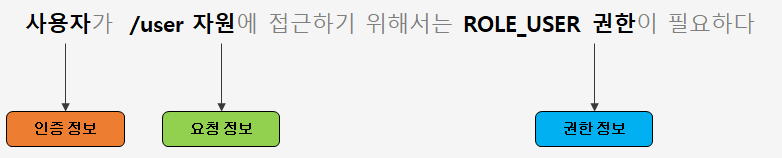
- 얻을 수 있는 정보 = 인증정보, 요청 정보, 권한 정보

동작 과정
- 각각의 Key-Value로 자원에 따른 권한 정보를 저장한다.
- SecuirtyIntercepteor 가 파라미터로 인증정보, 요청정보, 권한정보를 전달해 준다.
- 3개의 정보 읽어오기
-
protected InterceptorStatusToken beforeInvocation(Object object) {
    Assert.notNull(object, "Object was null");
    if (!this.getSecureObjectClass().isAssignableFrom(object.getClass())) {
        throw new IllegalArgumentException("Security invocation attempted for object " + object.getClass().getName() + " but AbstractSecurityInterceptor only configured to support secure objects of type: " + this.getSecureObjectClass());
    } else {
        Collection<ConfigAttribute> attributes = this.obtainSecurityMetadataSource().getAttributes(object);
        if (CollectionUtils.isEmpty(attributes)) {
            Assert.isTrue(!this.rejectPublicInvocations, () -> {
                return "Secure object invocation " + object + " was denied as public invocations are not allowed via this interceptor. This indicates a configuration error because the rejectPublicInvocations property is set to 'true'";
            });
            if (this.logger.isDebugEnabled()) {
                this.logger.debug(LogMessage.format("Authorized public object %s", object));
            }

            this.publishEvent(new PublicInvocationEvent(object));
            return null;
        } else {
            if (SecurityContextHolder.getContext().getAuthentication() == null) {
                this.credentialsNotFound(this.messages.getMessage("AbstractSecurityInterceptor.authenticationNotFound", "An Authentication object was not found in the SecurityContext"), object, attributes);
            }

            Authentication authenticated = this.authenticateIfRequired();
            if (this.logger.isTraceEnabled()) {
                this.logger.trace(LogMessage.format("Authorizing %s with attributes %s", object, attributes));
            }

            this.attemptAuthorization(object, attributes, authenticated);
            if (this.logger.isDebugEnabled()) {
                this.logger.debug(LogMessage.format("Authorized %s with attributes %s", object, attributes));
            }

            if (this.publishAuthorizationSuccess) {
                this.publishEvent(new AuthorizedEvent(object, attributes, authenticated));
            }

            Authentication runAs = this.runAsManager.buildRunAs(authenticated, object, attributes);
            if (runAs != null) {
                SecurityContext origCtx = SecurityContextHolder.getContext();
                SecurityContext newCtx = SecurityContextHolder.createEmptyContext();
                newCtx.setAuthentication(runAs);
                SecurityContextHolder.setContext(newCtx);
                if (this.logger.isDebugEnabled()) {
                    this.logger.debug(LogMessage.format("Switched to RunAs authentication %s", runAs));
                }

                return new InterceptorStatusToken(origCtx, true, attributes, object);
            } else {
                this.logger.trace("Did not switch RunAs authentication since RunAsManager returned null");
                return new InterceptorStatusToken(SecurityContextHolder.getContext(), false, attributes, object);
            }
        }
-
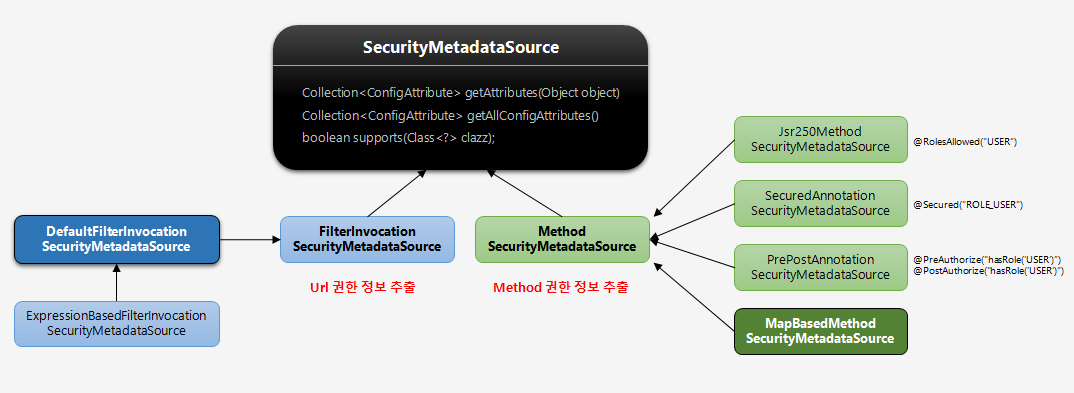
주요과정
- DefaultFilterInvocationSecurityMetadataSource를 구현한 구현체를 직접 구현하여 동작시킬 것이다.
728x90
'스프링 시큐리티 > 실전프로젝트 - 인가 프로세스 DB 연동 웹 계층 구현' 카테고리의 다른 글
| ch06. 웹 기반 인가처리 실시간 반영하기 (0) | 2022.01.24 |
|---|---|
| ch05. 웹 기반 인가처리 DB 연동 - FilterInvocationSecurityMetadataSource (2) (0) | 2022.01.24 |
| ch04. 웹 기반 인가처리 DB 연동 - FilterInvocationSecurityMetadataSource (1) (0) | 2022.01.24 |
| ch02. 관리자 시스템 - 권한 도메인, 서비스, 리포지토리 구성 (0) | 2022.01.23 |
| ch01. 스프링 시큐리티 인가 개요 (0) | 2022.01.23 |