728x90
<!DOCTYPE HTML>
<html xmlns:th="http://www.thymeleaf.org">
<head th:replace="fragments/header :: header"/>
<body>
<div class="container">
    <div th:replace="fragments/bodyHeader :: bodyHeader"/>
    <div>
        <div>
            <form th:object="${orderSearch}" class="form-inline">
                <div class="form-group mb-2">
                    <input type="text" th:field="*{memberName}" class="formcontrol" placeholder="회원명"/>
                </div>
                <div class="form-group mx-sm-1 mb-2">
                    <select th:field="*{orderStatus}" class="form-control">
                        <option value="">주문상태</option>
                        <option th:each=
                                        "status : ${T(jpabook.jpashop.domain.OrderStatus).values()}"
                                th:value="${status}"
                                th:text="${status}">option
                        </option>
                    </select>
                </div>
                <button type="submit" class="btn btn-primary mb-2">검색</button>
            </form>
        </div>
        <table class="table table-striped">
            <thead>
            <tr>
                <th>#</th>
                <th>회원명</th>
                <th>대표상품 이름</th>
                <th>대표상품 주문가격</th>
                <th>대표상품 주문수량</th>
                <th>상태</th>
                <th>일시</th>
                <th></th>
            </tr>
            </thead>
            <tbody>
            <tr th:each="item : ${orders}">
                <td th:text="${item.id}"></td>
                <td th:text="${item.member.name}"></td>
                <td th:text="${item.orderItems[0].item.name}"></td>
                <td th:text="${item.orderItems[0].orderPrice}"></td>
                <td th:text="${item.orderItems[0].count}"></td>
                <td th:text="${item.status}"></td>
                <td th:text="${item.orderDate}"></td>
                <td>
                    <a th:if="${item.status.name() == 'ORDER'}" href="#"
                       th:href="'javascript:cancel('+${item.id}+')'"
                       class="btn btn-danger">CANCEL</a>
                </td>
            </tr>
            </tbody>
        </table>
    </div>
    <div th:replace="fragments/footer :: footer"/>
</div> <!-- /container -->
</body>
<script>
 function cancel(id) {
 var form = document.createElement("form");
 form.setAttribute("method", "post");
 form.setAttribute("action", "/orders/" + id + "/cancel");
 document.body.appendChild(form);
 form.submit();
 }
</script>
</html>- 주문 조회 메서드
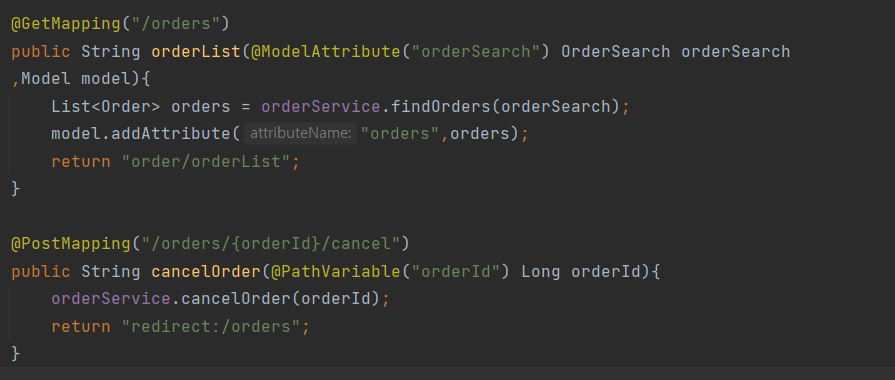
- Binding 된 파라미터를 가지고 조회하여 모든 Order를 출력한다.
- 검색 조건 같은 경우 그대로 가지고 가서 출력해준다.
- 검색 조건으로 출력된 데이터를 하단의 리스트로 출력해준다.
- 주문 삭제 메서드
- id를 입력받아 해당 주문을 삭제하는 메서드를 작성한다.
728x90
'실전! 스프링 부트와 JPA 활용1(웹 애플리케이션 개발)' 카테고리의 다른 글
| Ch01. 프로젝트 환경설정 - H2 데이터베이스, JPA와 DB 설정 동작 확인 (0) | 2022.04.26 |
|---|---|
| Ch01. 프로젝트 환경설정 - View 환경 설정 (0) | 2022.04.24 |
| Ch07. 웹 계층 개발 - 상품 주문 (0) | 2021.12.07 |
| Ch07. 웹 계층 개발 - 변경 감지와 병합(merge) (0) | 2021.12.07 |
| Ch07. 웹 계층 개발 - 상품 수정 (0) | 2021.12.07 |