728x90
-
import react, { Component } from "react";

class LifeCycleSample extends Component {
  state = {
    number: 0,
    color: null,
  };
  myRef = null; //Ref를 설정할 부분
  constructor(props) {
    super(props);
    console.log("constructor");
  }
  static getDerivedStateFromProps(nextProps, prevState) {
    console.log("getDerivedStateFromProps");
    if (nextProps.color !== prevState.color) {
      return { color: nextProps.color };
    }
    return null;
  }
  componentDidMount() {
    console.log("componentDidMount");
  }
  shouldComponentUpdate(nextProps, nextState) {
    console.log("shouldComponentUpdate", nextProps, nextState);
    return nextState.number % 10 !== 4;
  }
  componentWillUnmount() {
    console.log("componentWillUnmount");
  }
  handleClick = () => {
    this.setState({
      number: this.state.number + 1,
    });
  };
  getSnapshotBeforeUpdate(prevProps, prevState) {
    console.log("getSnapshotBeforeUpdate");
    if (prevProps.color !== this.props.color) {
      return this.myRef.style.color;
    }
    return null;
  }
  componentDidUpdate(prevProps, prevState, snapshot) {
    console.log("componentDidUpdate", prevProps, prevState);
    if (snapshot) {
      console.log("업데이트되기 직전 색상: ", snapshot);
    }
  }
  render() {
    console.log("render");
    const style = {
      color: this.props.color,
    };
    return (
      <div>
        <h1 style={style} ref={(ref) => (this.myRef = ref)}>
          {this.state.number}
        </h1>
        <p>color:{this.state.color}</p>
        <button onClick={this.handleClick}>더하기</button>
      </div>
    );
  }
}
export default LifeCycleSample;
- 각 라이프 사이클 메서드를 실행할 때마다 콘솔 디버거에 기록하고, 부모 컴포넌트에서 props로 색상을 받아 버튼을 누르면 state.number값을 1씩 더하도록 구현
- getDerivedStateFromProps는 부모에게 받은 color값을 state에 동기화한다.
- getSnapshotBeforeUpdate는 DOM에 변화가 일어나기 직전의 색상 속성을 snapshot값으로 반환하여
componentDidUpdate에서 조회할 수 있게 했다
- shouldCOmponentUpdate에서 state.number값의 마지막 자릿수가 4이면 리 렌더링을 취소하도록 설정
-
import React, { Component } from "react"; import LifeCycleSample from "./LifeCycleSample"; function getRandomColor() { return "#" + Math.floor(Math.random() * 16777215).toString(16); } class App extends Component { state = { color: "#000000", }; handleClick = () => { this.setState({ color: getRandomColor(), }); }; render() { return ( <div> <button onClick={this.handleClick}>랜덤 색상</button> <LifeCycleSample color={this.state.color} /> </div> ); } } export default App;
- getRandomColor 함수는 state의 color값을 랜덤 색상으로 설정한다.(000000~ffffff)
- 버튼을 렌더링하고 누를 때마다 handleClick 메서드가 호출되며 LifeCycleSample 컴포넌트에 color값을 props로 설정한다.
에러 잡아내기
- render() 함수에 의도적으로 에러를 발생시킨다.
-
import react, { Component } from "react";

class ErrorBoundary extends Component {
  state = {
    error: false,
  };
  componentDidCatch(error, info) {
    this.setState({
      error: true,
    });
    console.log({ error, info });
  }
  render() {
    if (this.state.error) return <div>에러가 발생했습니다!</div>;
    return this.props.children;
  }
}
export default ErrorBoundary;
- 에러가 발생하면 componentDidCatch 메서드가 호출되며 this.state.error값을 true로 업데이트해준다.
- render함수에서 this.state.error값이 true라면 에러가 발생했음을 알려주는 문구를 보여준다
-
import React, { Component } from "react";
import ErrorBoundary from "./ErrorBoundary";
import LifeCycleSample from "./LifeCycleSample";

function getRandomColor() {
  return "#" + Math.floor(Math.random() * 16777215).toString(16);
}

class App extends Component {
  state = {
    color: "#000000",
  };
  handleClick = () => {
    this.setState({
      color: getRandomColor(),
    });
  };
  render() {
    return (
      <div>
        <button onClick={this.handleClick}>랜덤 색상</button>
        <ErrorBoundary>
          <LifeCycleSample color={this.state.color} />
        </ErrorBoundary>
      </div>
    );
  }
}

export default App;
- ErrorBoundary로 LifeSample을 감싸면 된다.

에러 보여주기
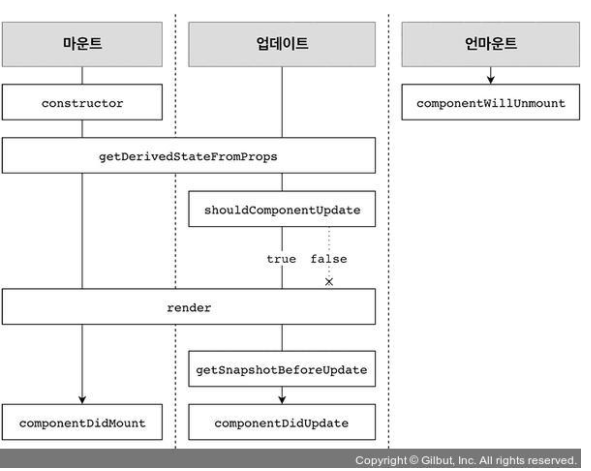
라이프사이클 한눈에 보기
728x90
'리액트 > 컴포넌트의라이프사이클' 카테고리의 다른 글
| ch02.라이프사이클 메서드 살펴보기 (0) | 2021.11.11 |
|---|---|
| ch01.라이프사이클 메서드의 이해 (0) | 2021.11.11 |