728x90
실습
1) 3개의 파티션을 가지는 Topic 생성
kafka-topics --bootstrap-server localhost:9092 --create --topic multipart-topic --partitions 3
2) Kafka-Console-Consumer를 수행해서 메시지 읽기 대기
kafka-console-consumer --bootstrap-server localhost:9092 --topic multipart-topic
3) Topic에 kafka-console-producer 수행하여 메시지 전송
kafka-console-producer --bootstrap-server localhost:9092 --topic multipart-topic
4) Topic에 kafka-console-consumer를 --from-beginning으로 수행하고 읽어 들인 메시지와 partition 번호 확인
kafka-console-consumer --bootstrap-server localhost:9092 --topic multipart-topic \
--from-beginning --property print.partition=true
- 보통 Consumer가 읽어올 때 배치 단위로 읽어오기 때문에 파티션 레벨로는 순서가 보장이 된다.
5) Key를 가지는 메시지를 읽어들임.
kafka-console-producer --bootstrap-server localhost:9092 --topic multipart-topic \
--property key.separator=: --property parse.key=true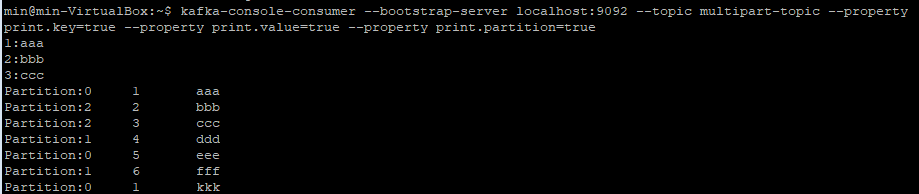
6) Key를 가지는 메시지를 전송
kafka-console-consumer --bootstrap-server localhost:9092 --topic multipart-topic \
--property print.key=true --property print.value=true \
--property print.partition=true
728x90
'카프카 > Kakfa Topic, Producer, Consumer' 카테고리의 다른 글
| Consumer Group과 Consumer (0) | 2025.08.04 |
|---|---|
| Key가 없는 메시지의 파티션 분배 전략 - 라운드 로빈과 스티키 파티셔닝 (0) | 2025.07.21 |
| Key값을 가지는 메시지의 전송 (0) | 2025.07.18 |
| Producer의 객체 직렬화(Serializer) 전송의 이해 (0) | 2025.07.18 |
| Producer와 Consumer (0) | 2025.07.17 |