728x90
Resource Owner Password

- OAuth2AuthorizeRequest(요청 객체)를 OAuth2AuthorizedClientManager에 전달한다.
- 만약 OAuth2AuthorizedClient 객체가 null이 아닐 경우 인증된 사용자로 보고 바로 return 을 한다.
- 만약 OAuth2AuthorizedClient 객체가 null일 경우 OAuth2AuthorizationContext에 저장하여, PasswordOAuth2AuthorizedClientProvider에게 클라이언트 인가 요청을 한다.
- OAuth2AuthorizedClient가 존재하고, AccessToken이 만료되지 않았다면 권한 부여는 다시 하지 않는다.
- OAuth2AuthorizedClient가 존재하고, AccessToken이 만료되고, RefreshToken이 존재하면 null을 반환하고 RefreshTokenOAuth2AuthorizedClientProvider에게 처리하도록 한다.
- DefaultPasswordTokenResponseClient가 OAuth2PasswordGrantRequestEntityConverter가 인증 서버와 RestTemplate으로 통신을 해 OAuth2AccessTokenResponse에 응답을 받아온다.
- 만약 예외 발생시 OAuth2AuthorizationFailureHandler에서 예외를 처리하면 된다.
- 성공하게 된다면, OAuth2AccessTokenResponse에 응답으로 받아온 값을 OAuth2AuthorizedClient에 저장 후, OAuth2AuthorizationSuccessHandler에서 성공 처리를 진행하면 된다.
Test
application.yml
server:
  port: 8081
spring:
  security:
    oauth2:
      client:
        registration:
          keycloak:
            client-id: oauth2-client-app
            client-name: oauth2-client-app
            client-secret: xSlqD456gfAeLZO93BLbTwQys0NEc8KL
            authorization-grant-type: password
            scope:
              - profile
              - openid
            client-authentication-method: client_secret_basic
            provider: keycloak
        provider:
          keycloak:
            authorization-uri: http://localhost:8080/realms/oauth2/protocol/openid-connect/auth
            issuer-uri: http://localhost:8080/realms/oauth2
            jwk-set-uri: http://localhost:8080/realms/oauth2/protocol/openid-connect/certs
            token-uri: http://localhost:8080/realms/oauth2/protocol/openid-connect/token
            user-info-uri: http://localhost:8080/realms/oauth2/protocol/openid-connect/userinfo
            user-name-attribute: preferred_username
Index.html
<!DOCTYPE html SYSTEM "http://www.thymeleaf.org/dtd/xhtml1-strict-thymeleaf-4.dtd">
<html xmlns="http://www.w3.org/1999/xhtml"
      xmlns:th="http://www.thymeleaf.org"
      xmlns:sec="http://www.thymeleaf.org/extras/spring-security">

<head>
  <meta charset="UTF-8">
  <title>Insert title here</title>
  <script>
    function authorizationCode(){
      window.location = new URL('http://localhost:8081/oauth2/authorization/keycloak');
    }

  </script>
</head>
<body>
<div>Welcome</div>
<form sec:authorize="isAnonymous()" action="#">
  <p><input type="button" onclick="authorizationCode()" value="AuthorizationCode Grant" /></p>
  <p><div sec:authorize="isAnonymous()"><a th:href="@{/oauth2Login(username='user',password='1234')}">Password Flow Login</a></div></p>
</form>
</body>
</html>
AppConfig
@Configuration
public class AppConfig {

  @Bean
  public DefaultOAuth2AuthorizedClientManager auth2AuthorizedClientManager(
      ClientRegistrationRepository clientRegistrationRepository,
      OAuth2AuthorizedClientRepository clientRepository) {

    OAuth2AuthorizedClientProvider auth2AuthorizedClientProvider =
        OAuth2AuthorizedClientProviderBuilder.builder()
            .authorizationCode()
            .clientCredentials()
            .password()
            .refreshToken()
            .build();

    DefaultOAuth2AuthorizedClientManager oAuth2AuthorizedClientManager =
        new DefaultOAuth2AuthorizedClientManager(clientRegistrationRepository, clientRepository);

    oAuth2AuthorizedClientManager.setAuthorizedClientProvider(auth2AuthorizedClientProvider);
    oAuth2AuthorizedClientManager.setContextAttributesMapper(contextAttributesMapper());
    return oAuth2AuthorizedClientManager;
  }

  private Function<OAuth2AuthorizeRequest, Map<String, Object>> contextAttributesMapper() {
    return oAuth2AuthorizeRequest -> {
      Map<String, Object> contextAttributes = new HashMap<>();
      HttpServletRequest request = oAuth2AuthorizeRequest.getAttribute(HttpServletRequest.class.getName());
      String username = request.getParameter(OAuth2ParameterNames.USERNAME);
      String password = request.getParameter(OAuth2ParameterNames.PASSWORD);
      if(StringUtils.hasText(username) && StringUtils.hasText(password)){
        contextAttributes.put(OAuth2AuthorizationContext.USERNAME_ATTRIBUTE_NAME, username);
        contextAttributes.put(OAuth2AuthorizationContext.PASSWORD_ATTRIBUTE_NAME, password);
      }
      return contextAttributes;
    };
  }
}
LoginController
@Controller
public class LoginController {

  @Autowired
  private DefaultOAuth2AuthorizedClientManager oAuth2AuthorizedClientManager;

  @Autowired
  private OAuth2AuthorizedClientRepository oAuth2AuthorizedClientRepository;

  @GetMapping("/oauth2Login")
  public String oauth2Login(Model model, HttpServletRequest request, HttpServletResponse response) {

    Authentication authentication = SecurityContextHolder.getContext().getAuthentication();

    OAuth2AuthorizeRequest auth2AuthorizeRequest =
        OAuth2AuthorizeRequest.withClientRegistrationId("keycloak")
            .principal(authentication)
            .attribute(HttpServletRequest.class.getName(), request)
            .attribute(HttpServletResponse.class.getName(), response)
            .build();

    OAuth2AuthorizationSuccessHandler successHandler = (authorizedClient, principal, attributes) -> {
      oAuth2AuthorizedClientRepository
          .saveAuthorizedClient(authorizedClient, principal,
              (HttpServletRequest) attributes.get(HttpServletRequest.class.getName()),
              (HttpServletResponse) attributes.get(HttpServletResponse.class.getName()));
      System.out.println("authorizedClient = " + authorizedClient);
      System.out.println("principal = " + principal);
      System.out.println("attributes = " + attributes);
    };
    oAuth2AuthorizedClientManager.setAuthorizationSuccessHandler(successHandler);


    OAuth2AuthorizedClient authorizedClient = oAuth2AuthorizedClientManager.authorize(
        auth2AuthorizeRequest);

    if (authorizedClient != null) {
      //인증이 성공했을때
      OAuth2UserService<OAuth2UserRequest, OAuth2User> oAuth2UserService = new DefaultOAuth2UserService();
      ClientRegistration clientRegistration = authorizedClient.getClientRegistration();
      OAuth2AccessToken accessToken = authorizedClient.getAccessToken();
      OAuth2UserRequest oAuth2UserRequest = new OAuth2UserRequest(clientRegistration, accessToken);
      OAuth2User oAuth2User = oAuth2UserService.loadUser(oAuth2UserRequest);

      SimpleAuthorityMapper authorityMapper = new SimpleAuthorityMapper(); //Scope를 통해 커스텀하게 권한 조율 가능
      authorityMapper.setPrefix("SYSTEM_"); //SYSTEM_SCOPE_XXX
      Set<GrantedAuthority> grantedAuthorities = authorityMapper.mapAuthorities(
          oAuth2User.getAuthorities());
      OAuth2AuthenticationToken oAuth2AuthenticationToken = new OAuth2AuthenticationToken(
          oAuth2User, grantedAuthorities, clientRegistration.getRegistrationId());

      SecurityContextHolder.getContext().setAuthentication(oAuth2AuthenticationToken);

      model.addAttribute("oAuth2AuthenticationToken", oAuth2AuthenticationToken);
    }
    return "home";
  }

  @GetMapping("/logout")
  public String logout(Authentication authentication, HttpServletRequest request,
      HttpServletResponse response) {
    SecurityContextLogoutHandler logoutHandler = new SecurityContextLogoutHandler();
    logoutHandler.logout(request, response, authentication);
    return "redirect:/";
  }
}
UserInfo 요청
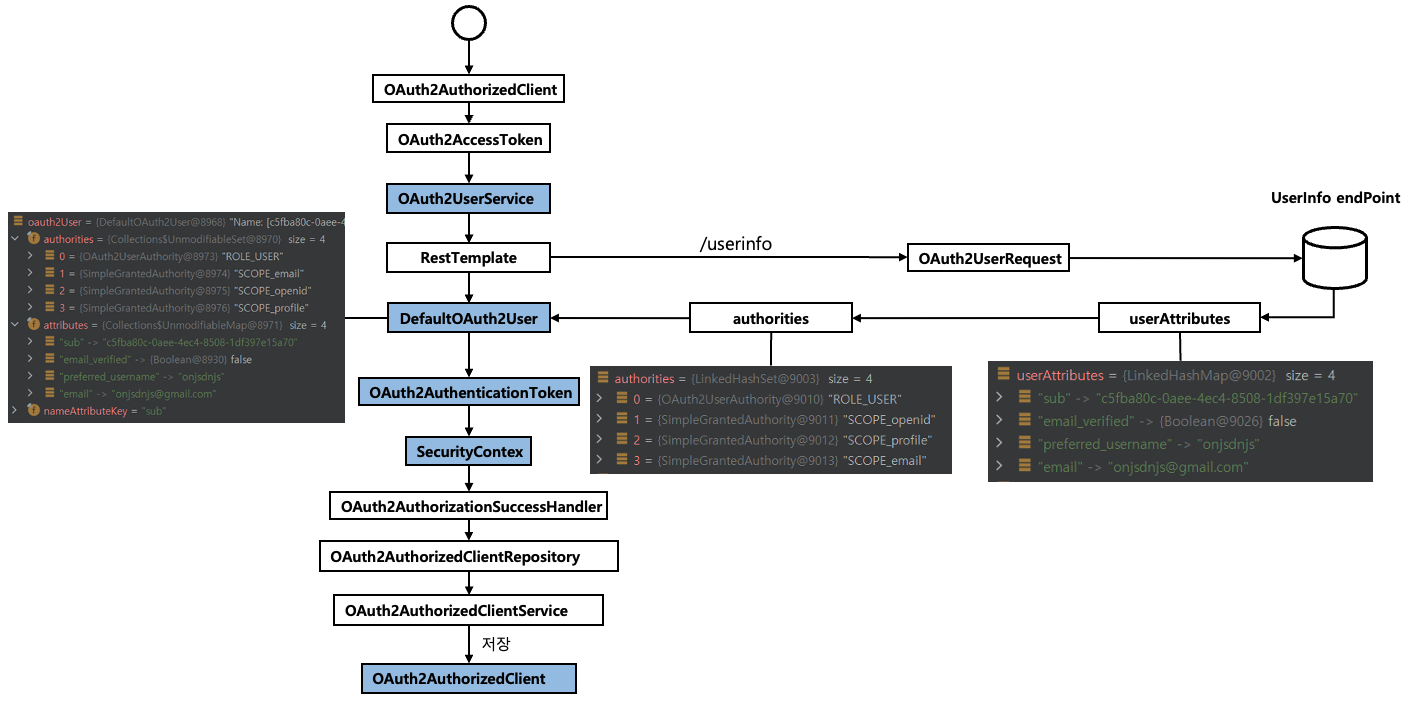
- OAuth2AuthorizedClient에서 OAuth2AccessToken 값을 가지고, OAuth2UserService를 통해 "/userinfo" 로 요청을 해 인증 서버로 부터 User 정보를 가지고 온다.
- 얻어온 정보를 통해 OAuth2AuthenticationToken을 만들어 SecurityContext에 담고(스프링 시큐리티가 인증이 되었다고 판단), OAuth2AuthorizationSuccessHandler에서 후속처리를 하면된다.
- OAuth2AuthorizedClientRepository, OAuth2AuthorizedClientService에서 OAuth2AuthorizedClient 정보를 저장하여 어디서나 해당 값을 꺼낼수 있도록 한다.
728x90
'스프링 시큐리티 OAuth2 > OAuth 2.0 Client - oauth2Client()' 카테고리의 다른 글
| DefaultOAuth2AuthorizedClientManager - Refresh Token 권한 부여 구현하기 (0) | 2023.02.22 |
|---|---|
| DefaultOAuth2AuthorizedClientManager - Client Credentials 권한 부여 구현하기 (0) | 2023.02.21 |
| DefaultOAuth2AuthorizedClientManager (0) | 2023.01.29 |
| OAuth2AuthorizedClient 이해 및 활용 (0) | 2023.01.27 |
| OAuth2ClientConfigurer 초기화 이해 (0) | 2023.01.27 |