전체 코드
/**
 * JdbcTemplate
 */
@Slf4j
public class JdbcTemplateItemRepositoryV1 implements ItemRepository {

    private final JdbcTemplate template;

    public JdbcTemplateItemRepositoryV1(DataSource dataSource) {
        this.template = new JdbcTemplate(dataSource);
    }

    @Override
    public Item save(Item item) {
        String sql = "insert into item(item_name, price, quantity) values (?, ?, ?)";
        KeyHolder keyHolder = new GeneratedKeyHolder();
        template.update(connection -> {
            //자동 증가 키
            PreparedStatement ps = connection.prepareStatement(sql, new String[]{"id"});
            ps.setString(1, item.getItemName());
            ps.setInt(2, item.getPrice());
            ps.setInt(3, item.getQuantity());
            return ps;
        }, keyHolder);
        long key = keyHolder.getKey().longValue();
        item.setId(key);
        return item;
    }

    @Override
    public void update(Long itemId, ItemUpdateDto updateParam) {
        String sql = "update item set item_name = ?, price = ?, quantity = ? where id=?";
        template.update(sql,
            updateParam.getItemName(),
            updateParam.getPrice(),
            updateParam.getQuantity(),
            itemId);
    }

    @Override
    public Optional<Item> findById(Long id) {
        String sql = "select id, item_name, price from item where id = ?";
        try {
            Item item = template.queryForObject(sql, itemRowMapper(), id);
            return Optional.of(item);
        }catch (EmptyResultDataAccessException e){
            return Optional.empty();
        }
    }

    @Override
    public List<Item> findAll(ItemSearchCond cond) {
        String itemName = cond.getItemName();
        Integer maxPrice = cond.getMaxPrice();
        String sql = "select id, item_name, price, quantity from item";
        //동적 쿼리
        if (StringUtils.hasText(itemName) || maxPrice != null) {
            sql += " where";
        }
        boolean andFlag = false;
        List<Object> param = new ArrayList<>();
        if (StringUtils.hasText(itemName)) {
            sql += " item_name like concat('%',?,'%')";
            param.add(itemName);
            andFlag = true;
        }
        if (maxPrice != null) {
            if (andFlag) {
                sql += " and";
            }
            sql += " price <= ?";
            param.add(maxPrice);
        }
        log.info("sql={}", sql);
        return template.query(sql, itemRowMapper(), param.toArray());
    }

    private RowMapper<Item> itemRowMapper() {
        return ((rs, rowNum) ->{
            Item item = new Item();
            item.setId(rs.getLong("id"));
            item.setItemName(rs.getString("item_name"));
            item.setPrice(rs.getInt("price"));
            item.setQuantity(rs.getInt("quantity"));
            return item;
        });
    }
}- JdbcTemplateItemRepositoryV1 은 ItemRepository 인터페이스를 구현했다.
- this.template = new JdbcTemplate(dataSource)
- JdbcTemplate 은 데이터 소스( dataSource )가 필요하다.
- JdbcTemplateItemRepositoryV1() 생성자를 보면 dataSource를 의존 관계 주입받고 생성자 내부에서 JdbcTemplate을 생성한다. 스프링에서는 JdbcTemplate을 사용할 때 관례상 이 방법을 많이 사용한다.
- 물론 JdbcTemplate을 스프링 빈으로 직접 등록하고 주입받아도 된다
Save()
@Override
public Item save(Item item) {
    String sql = "insert into item(item_name, price, quantity) values (?, ?, ?)";
    KeyHolder keyHolder = new GeneratedKeyHolder();
    template.update(connection -> {
        //자동 증가 키
        PreparedStatement ps = connection.prepareStatement(sql, new String[]{"id"});
        ps.setString(1, item.getItemName());
        ps.setInt(2, item.getPrice());
        ps.setInt(3, item.getQuantity());
        return ps;
    }, keyHolder);
    long key = keyHolder.getKey().longValue();
    item.setId(key);
    return item;
}
- template.update() : 데이터를 변경할 때는 update()를 사용하면 된다.
- INSERT , UPDATE , DELETE SQL에 사용한다.
- template.update()의 반환 값은 int인데, 영향받은 로우 수를 반환한다.
- 데이터를 저장할 때 PK 생성에 identity (auto increment) 방식을 사용하기 때문에, PK인 ID 값을 개발자가 직접 지정하는 것이 아니라 비워두고 저장해야 한다. 그러면 데이터베이스가 PK인 ID를 대신 생성해준다.
- 문제는 이렇게 데이터베이스가 대신 생성해주는 PK ID 값은 데이터베이스가 생성하기 때문에, 데이터베이스에 INSERT가 완료되어야 생성된 PK ID 값을 확인할 수 있다.
- KeyHolder 와 connection.prepareStatement(sql, new String []{"id"}) 를 사용해서 id를 지정해주면 INSERT 쿼리 실행 이후에 데이터베이스에서 생성된 ID 값을 조회할 수 있다.
- 물론 데이터베이스에서 생성된 ID 값을 조회하는 것은 순수 JDBC로도 가능하지만, 코드가 훨씬 더 복잡하다.
- 참고로 뒤에서 설명하겠지만 JdbcTemplate이 제공하는 SimpleJdbcInsert 라는 훨씬 편리한 기능이 있으므로 대략 이렇게 사용한다 정도로만 알아두면 된다
Update()
@Override
public void update(Long itemId, ItemUpdateDto updateParam) {
    String sql = "update item set item_name = ?, price = ?, quantity = ? where id=?";
    template.update(sql,
        updateParam.getItemName(),
        updateParam.getPrice(),
        updateParam.getQuantity(),
        itemId);
}- template.update() : 데이터를 변경할 때는 update() 를 사용하면 된다.
- ? 에 바인딩할 파라미터를 순서대로 전달하면 된다.
- 반환 값은 해당 쿼리의 영향을 받은 로우 수 이다. 여기서는 where id=? 를 지정했기 때문에 영향받은 로우수는 최대 1개이다
findById()
@Override
public Optional<Item> findById(Long id) {
    String sql = "select id, item_name, price from item where id = ?";
    try {
        Item item = template.queryForObject(sql, itemRowMapper(), id);
        return Optional.of(item);
    }catch (EmptyResultDataAccessException e){
        return Optional.empty();
    }
}
QueryForObject()
@Override
@Nullable
public <T> T queryForObject(String sql, RowMapper<T> rowMapper, @Nullable Object... args) throws DataAccessException {
   List<T> results = query(sql, args, new RowMapperResultSetExtractor<>(rowMapper, 1));
   return DataAccessUtils.nullableSingleResult(results);
}- template.queryForObject()
- 결과 로우가 하나일 때 사용한다.
- RowMapper 는 데이터베이스의 반환 결과인 ResultSet을 객체로 변환한다.
- 결과가 없으면 EmptyResultDataAccessException 예외가 발생한다.
- 결과가 둘 이상이면 IncorrectResultSizeDataAccessException 예외가 발생한다.
- ItemRepository.findById() 인터페이스는 결과가 없을 때 Optional을 반환해야 한다. 따라서 결과가 없으면 예외를 잡아서 Optional.empty를 대신 반환하면 된다
findAll()
@Override
public List<Item> findAll(ItemSearchCond cond) {
    String itemName = cond.getItemName();
    Integer maxPrice = cond.getMaxPrice();
    String sql = "select id, item_name, price, quantity from item";
    //동적 쿼리
    if (StringUtils.hasText(itemName) || maxPrice != null) {
        sql += " where";
    }
    boolean andFlag = false;
    List<Object> param = new ArrayList<>();
    if (StringUtils.hasText(itemName)) {
        sql += " item_name like concat('%',?,'%')";
        param.add(itemName);
        andFlag = true;
    }
    if (maxPrice != null) {
        if (andFlag) {
            sql += " and";
        }
        sql += " price <= ?";
        param.add(maxPrice);
    }
    log.info("sql={}", sql);
    return template.query(sql, itemRowMapper(), param.toArray());
}
query()
@Override
public <T> List<T> query(String sql, RowMapper<T> rowMapper, @Nullable Object... args) throws DataAccessException {
   return result(query(sql, args, new RowMapperResultSetExtractor<>(rowMapper)));
}- template.query()
- 결과가 하나 이상일 때 사용한다.
- RowMapper 는 데이터베이스의 반환 결과인 ResultSet을 객체로 변환한다.
- 결과가 없으면 빈 컬렉션을 반환한다.
- 동적 쿼리에 대한 부분은 바로 다음에 다룬다.
itemRowMapper()
private RowMapper<Item> itemRowMapper() {
    return ((rs, rowNum) ->{
        Item item = new Item();
        item.setId(rs.getLong("id"));
        item.setItemName(rs.getString("item_name"));
        item.setPrice(rs.getInt("price"));
        item.setQuantity(rs.getInt("quantity"));
        return item;
    });
}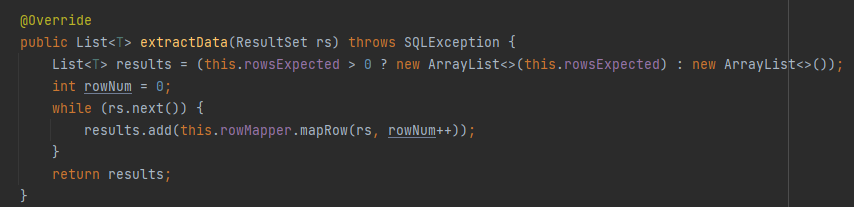
- 데이터베이스의 조회 결과를 객체로 변환할 때 사용한다. JDBC를 직접 사용할 때 ResultSet를 사용했던 부분을 떠올리면 된다. 차이가 있다면 다음과 같이 JdbcTemplate이 다음과 같은 루프를 돌려주고, 개발자는 RowMapper를 구현해서 그 내부 코드만 채운다고 이해하면 된다.
동적 쿼리 문제
결과를 검색하는 findAll() 에서 어려운 부분은 사용자가 검색하는 값에 따라서 실행하는 SQL이 동적으로 달려져야 한다는 점이다.
검색 조건이 없음
select id, item_name, price, quantity from item상품명( itemName )으로 검색
select id, item_name, price, quantity from item
where item_name like concat('%',?,'%')
최대 가격( maxPrice )으로 검색
select id, item_name, price, quantity from item where price <= ?상품명( itemName ), 최대 가격( maxPrice ) 둘 다 검색
select id, item_name, price, quantity from item where item_name like concat('%',?,'%') and price <= ?- 결과적으로 4가지 상황에 따른 SQL을 동적으로 생성해야 한다.
- 동적 쿼리가 언듯 보면 쉬워 보이지만, 막상 개발해보면 생각보다 다양한 상황을 고민해야 한다. 예를 들어서 어떤 경우에는 where를 앞에 넣고 어떤 경우에는 and를 넣어야 하는지 등을 모두 계산해야 한다. 그리고 각 상황에 맞추어 파라미터도 생성해야 한다.
- 물론 실무에서는 이보다 훨씬 더 복잡한 동적 쿼리들이 사용된다
- 참고로 이후에 설명할 MyBatis의 가장 큰 장점은 SQL을 직접 사용할 때 동적 쿼리를 쉽게 작성할 수 있다는 점이다
구성과 실행
JdbcTemplateV1Config
@Configuration
@RequiredArgsConstructor
public class JdbcTemplateV1Config {
    private final DataSource dataSource;

    @Bean
    public ItemService itemService(){
        return new ItemServiceV1(itemRepository());
    }

    @Bean
    public ItemRepository itemRepository(){
        return new JdbcTemplateItemRepositoryV1(dataSource);
    }

}- ItemRepository 구현체로 JdbcTemplateItemRepositoryV1 이 사용되도록 했다. 이제 메모리 저장소가 아니라 실제 DB에 연결하는 JdbcTemplate이 사용된다
ItemServiceApplication
//@Import(MemoryConfig.class)
@Import(JdbcTemplateV1Config.class)
@SpringBootApplication(scanBasePackages = "hello.itemservice.web")
public class ItemServiceApplication {
	...
}
데이터베이스 접근 설정
spring.profiles.active=local
spring.datasource.url=jdbc:h2:tcp://localhost/~/test
spring.datasource.username=sa

#jdbcTemplate sql log
logging.level.org.springframework.jdbc=debug- SpringBoot 가 해당 설정을 사용해서 커넥션 풀과 DataSource, 트랜잭션 매니저를 스프링 빈으로 자동 등록한다.
- 참고로 서버를 다시 시작할 때마다 TestDataInit 이 실행되기 때문에 itemA , itemB 도 데이터베이스에 계속 추가된다. 메모리와 다르게 서버가 내려가도 데이터베이스는 유지되기 때문이다
로그 추가
JdbcTemplate이 실행하는 SQL 로그를 확인하려면 application.properties 에 다음을 추가하면 된다. main , test 설정이 분리되어 있기 때문에 둘 다 확인하려면 두 곳에 모두 추가해야 한다
#jdbcTemplate sql log
logging.level.org.springframework.jdbc=debug
'스프링 DB 2편(데이터 접근 활용 기술)' 카테고리의 다른 글
| Ch02. 스프링 JdbcTemplate - JdbcTemplate(SimpleJdbcInsert) (0) | 2022.06.25 |
|---|---|
| Ch02. 스프링 JdbcTemplate - JdbcTemplate(이름 지정 파라미터) (0) | 2022.06.25 |
| Ch02. 스프링 JdbcTemplate - JdbcTemplate 소개와 설정 (0) | 2022.06.25 |
| Ch01. 시작 - 데이터베이스 테이블 생성 (0) | 2022.06.23 |
| Ch01. 시작 - 프로젝트 구조 설명(테스트) (0) | 2022.06.23 |