1. 마스터 노드 Init
kubeadm init #마스터 노드에서만 실행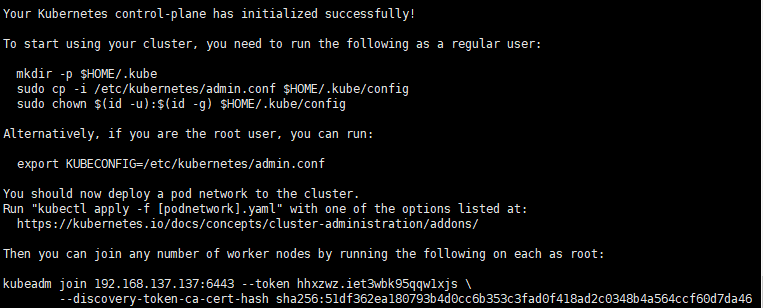
2. workNode 등록
kubeadm join ~~ 을 복사하여 해당 명령어 실행
- 이슈) 강의대로 진행하다가 오류가 발생하여 해당 블로그를 보고 해결
https://fusiondeveloper.tistory.com/65
...accepts at most 1 arg(s), received 3 To see the stack trace of this error execute with --v=5 or higher
'워커노드'를 '마스터노드'에 조인 하려니 다음과 같은 에러가 났다. ubuntu@ip-172-31-11-218:~$ sudo kubeadm join 172.31.3.175:6443 --token yevbd3.8h1jeuc6qu9cwlf6 .--discovery-token-ca-cert-hash sha25..
fusiondeveloper.tistory.com
- 이슈) 슬레이브 노드 추가 시 오류 발생하여 해당 블로그를 보고 해결
[ERROR FileAvailable--etc-kubernetes-pki-ca.crt]: /etc/kubernetes/pki/ca.crt already exists
#virtualbox #master node rm -rf /root/.kube/config kubeadm reset kubeadm init --pod-network-cidr=10.90.0.0/16 --apiserver-advertise-address=192.168.56.114 rm -rf /root/.kube/config mkdir -p..
UTEST.CO.KR
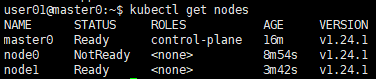
masterNode에 kubectl get nodes 명령어로 확인
3. wevenet 설치
아래의 URL 접속 후, Weve 를 선택하여 설치
https://kubernetes.io/docs/concepts/cluster-administration/addons/
Installing Addons
Note: This section links to third party projects that provide functionality required by Kubernetes. The Kubernetes project authors aren't responsible for these projects, which are listed alphabetically. To add a project to this list, read the content guide
kubernetes.io
4. application 베포
kubectl create deploy nx --image=nginx #nginx 베포
kubectl get pod #베포 됫 것 확인
kubectl expose deploy nx --type=NodePort --port=80 --target-port=80 #NodePort는 요청이 오면 마스터 노드에서 워크노드로 전달해 주는 역할을 한다.
kubectl get svc # 연결된 서비스 확인하기'데브옵스(DevOps)를 위한 쿠버네티스 마스터 > 쿠버네티스 들어가기' 카테고리의 다른 글
| AWS EKS를 활용한 쿠버네티스 사용 (0) | 2022.07.09 |
|---|---|
| GCP에 쿠버네티스 설치 및 실행 (0) | 2022.06.08 |
| master 노드와 work 노드 생성 (0) | 2022.06.06 |
| 우분투 환경에 클러스터 설치 (0) | 2022.06.04 |
| 구글 클라우드 플랫폼에서 쿠버네티스 시작하기 (0) | 2022.06.03 |